PixGen32: Talk to Your ESP32-S3 and Generate AI Images
Introducing PixGen32, a sleek desktop companion powered by an ESP32-S3 that uses I2S voice transcription and Pollinations AI to generate stunning images on a high-speed SPI display—entirely from your voice prompts.
What if you could physically build an AI image generator? No keyboards, no browsers, no complex software stacks. Just a standalone electronic gadget sitting on your desk that listens to your voice and paints whatever you describe directly onto a high-speed LCD screen.
That is the vision behind PixGen32. We have combined the processing power of the ESP32-S3 microcontroller, the incredible accuracy of the Groq Whisper AI transcription API, and the instant image generation of Pollinations AI into a single, highly optimized hardware architecture.
"PixGen32 strips away the complexity of AI tools. You tap a button, speak a prompt into the I2S microphone, and seconds later, a full-color AI-generated image appears on the screen."
The Hardware Architecture
To handle the intense memory requirements of JPEG decoding and audio buffering, PixGen32 is built explicitly for the ESP32-S3 (N16R8). We utilize a digital I2S microphone to ensure crystal-clear voice capture, minimizing background noise before it hits the AI transcription engine.
| Hardware Component | Specification / Model |
|---|---|
| Microcontroller | ESP32-S3 (16MB Flash / 8MB PSRAM) |
| Microphone | INMP441 (I2S Digital) |
| Display | 2.8" ILI9341 SPI (320x240) |
| Touch Controller | XPT2046 Resistive Touch |
Wiring Guide & Circuit Diagram
To successfully build this device, you must follow the exact pinout below. The TFT display and the Touch controller intentionally share the same hardware SPI bus (Pins 16/17/18) to maximize efficiency and save GPIO pins.
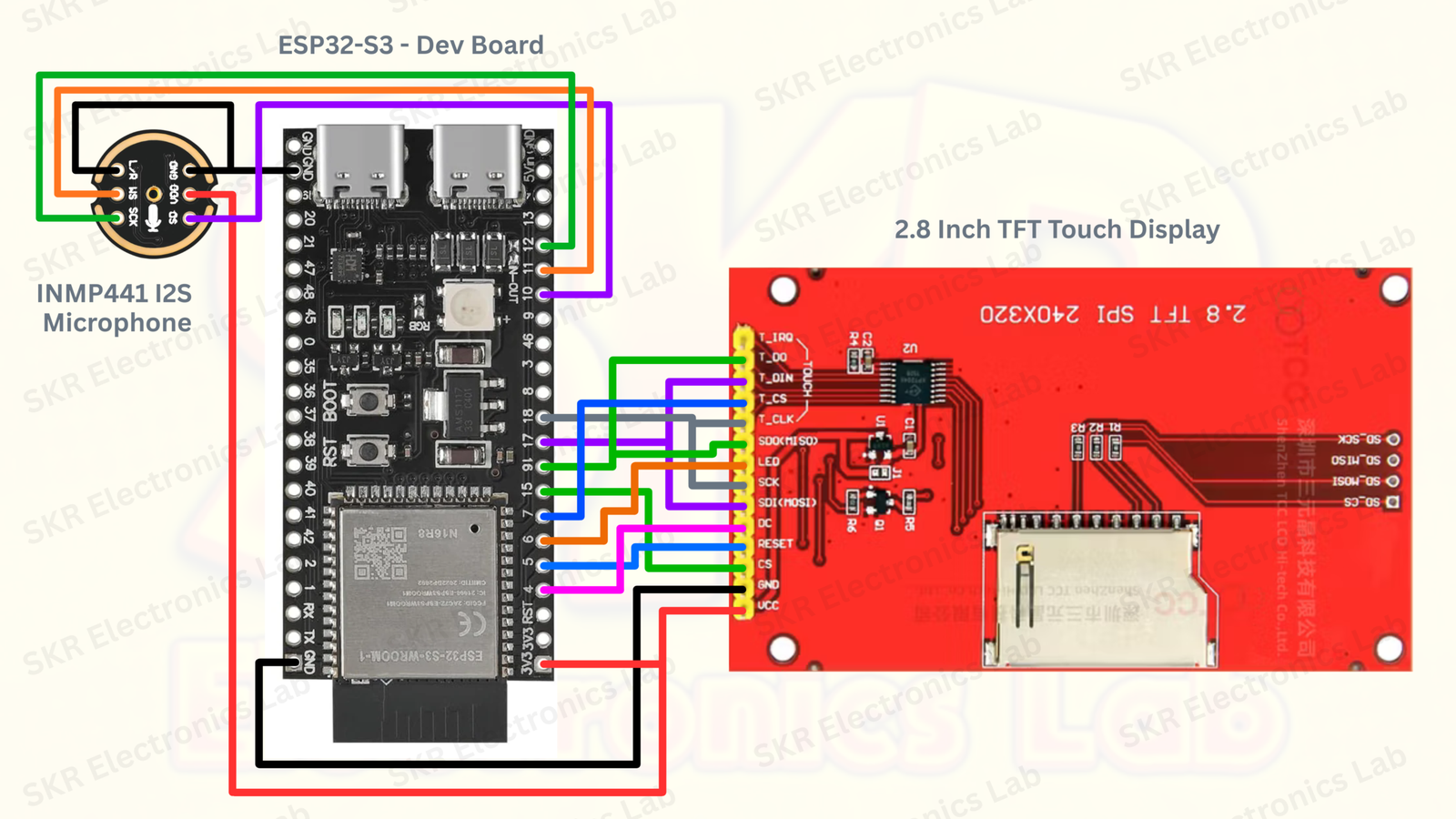
// TFT (ILI9341) & Touch (XPT2046) - Shared SPI Bus
TFT_SPI_SCLK = GPIO 18
TFT_SPI_MOSI = GPIO 17
TFT_SPI_MISO = GPIO 16

TFT_CS  = GPIO 15
TFT_DC  = GPIO 4
TFT_RST = GPIO 5
TFT_BL  = GPIO 6 (PWM Brightness Control)

TOUCH_CS  = GPIO 7
TOUCH_IRQ = GPIO 8

// Microphone (INMP441 I2S)
I2S_WS  = GPIO 11
I2S_SD  = GPIO 10
I2S_SCK = GPIO 12
Install PixGen32 Firmware Instantly
Connect your ESP32-S3 (16MB Flash / 8MB PSRAM) via USB. Close any serial monitors, then click below to securely flash the complete PixGen32 production firmware (v2.0.0) directly from your browser.
Flashing is completely local and runs securely in your browser via Web Serial.
No Hardcoded Wi-Fi Passwords
To make the device universally deployable, PixGen32 features a custom-built Captive Portal. On its first boot, the ESP32 broadcasts a secure Wi-Fi network (PixGen32-Setup). Connecting to this network redirects your phone to a sleek web dashboard, allowing you to seamlessly enter your home Wi-Fi credentials and your Groq API key directly into the chip's non-volatile storage (NVS).
Detailed Deep Dive: How the AI Pipeline Works
Generating a high-resolution AI image entirely via a microcontroller requires an incredibly optimized data pipeline. The ESP32 doesn't have the VRAM to generate images natively, so it acts as an intelligent hardware orchestrator, pushing cloud APIs to their absolute limits.
-
1. I2S Audio Capture & Buffering:
The process begins the moment you tap the screen. The ESP32 starts capturing raw 16-bit audio data at 16KHz directly from the INMP441 digital microphone using the I2S hardware peripheral. Because audio data is massive, the firmware utilizes the ESP32-S3's 8MB external PSRAM (Pseudo-Static RAM) to dynamically allocate a large memory buffer, safely storing up to 30 seconds of high-fidelity audio without crashing the internal SRAM.
-
2. Groq Whisper LPU Transcription:
Once you stop speaking, the ESP32 wraps the raw audio buffer into a highly structured
multipart/form-dataHTTP POST request and securely streams it over TLS/SSL to the Groq Cloud API. Groq uses a proprietary LPU (Language Processing Unit) architecture, meaning thewhisper-large-v3model transcribes your voice into English text with near-zero latency. The ESP32 parses the incoming JSON response and immediately displays your spoken prompt on the screen for confirmation. -
3. Pollinations AI Image Generation:
With a confirmed text prompt, the ESP32 constructs a URL-encoded string and targets Pollinations AI. By appending precise URL parameters (
?width=320&height=240&nologo=true) to the endpoint, we force the AI to generate an image perfectly tailored to our physical screen resolution. -
4. Non-Blocking JPEG Decoding:
Downloading a large image could freeze the microcontroller's UI. To prevent this, PixGen32 uses a custom
WiFiClientSecurestream to download the image asynchronously. As chunks of JPEG data arrive over Wi-Fi, they are passed directly into theTJpg_Decoderlibrary. This decoder uncompresses the image block-by-block and pushes Minimum Coded Units (MCUs) directly to the ILI9341 display via high-speed hardware SPI. This allows the LVGL loading animations to stay buttery smooth while the image paints itself onto the screen.
How to Get Your Free Groq API Key
PixGen32 uses Groq's insanely fast Language Processing Units (LPUs) to transcribe your voice instantly. Getting an API key is completely free and only takes a minute:
- Go to console.groq.com/keys and log in or create a free account.
- Click on the "Create API Key" button in the dashboard.
- Name your key (e.g., "PixGen32 Device") and hit submit.
- Copy the generated key (it starts with
gsk_). You will paste this directly into the PixGen32 Web Dashboard under the Advanced tab during setup!
How Can We Make It Better?
PixGen32 is already a highly capable desktop companion, but the AI space is moving incredibly fast. Here are several exciting ways this project can be upgraded and expanded in the future:
-
Hardware Upgrades:
While the ILI9341 is a classic, upgrading to a high-density IPS display (like an ST7789 or a parallel 8-bit screen) would drastically improve the color reproduction and viewing angles of the generated art. Additionally, integrating a dual-microphone array with hardware noise cancellation could improve transcription accuracy in noisy environments.
-
Premium Image Generation APIs:
Integrating optional premium APIs like DALL-E 3 (OpenAI) or Midjourney via a lightweight relay server would yield significantly higher-fidelity, photorealistic images.
-
Local AI Hosting Integration:
For ultimate privacy, PixGen32 could be adapted to communicate with a local server on your home network running Stable Diffusion (via tools like ComfyUI or Automatic1111). This would allow you to utilize your own desktop GPU to generate the art, completely bypassing cloud APIs while retaining the physical gadget interface.
Conclusion
PixGen32 proves that with the right APIs, robust C++ development, and clever hardware engineering, you can build premium, futuristic gadgets on your workbench. At SKR Electronics Lab, we are continuously exploring the absolute limits of embedded electronics and Artificial Intelligence. Stay tuned as we continue to build and deploy the next generation of AI-powered hardware.